Cowboy Icons: Integrating a Minimalist Icon Set into Your Creative Workflow
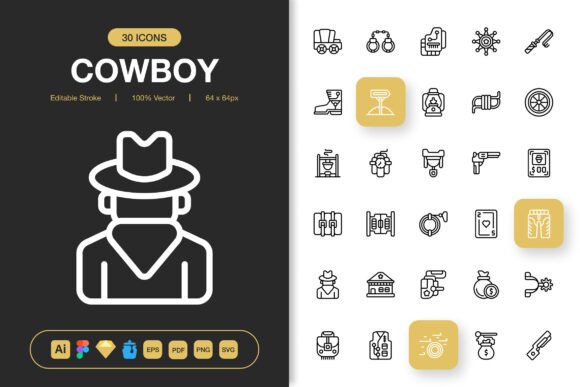
In any visual project, from a mobile app interface to a printed flyer, the details define the user experience. Among these details, icons serve a critical function: they communicate action, represent concepts, and guide navigation without relying on text. A well-chosen icon set can elevate a design, ensuring clarity and consistency across every touchpoint. The Cowboy Icons set is engineered specifically for this purpose—a collection of 100 high-quality, minimalist icons designed to integrate seamlessly into a wide range of creative and professional workflows.
The Role of a Unified Icon Set in Project Planning
Before diving into wireframes or layout drafts, establishing a visual asset library is a foundational step. This is where Cowboy Icons finds its first practical application. Instead of sourcing icons piecemeal from disparate platforms—each with differing styles, licenses, and file formats—you can begin your project with a complete, coherent toolkit. This upfront consolidation saves significant time during the initial planning and mood-board stages. It allows designers, marketers, and entrepreneurs to make confident early decisions about visual direction, knowing that the iconography will maintain a consistent aesthetic tone from the very first mockup.
Consider a common scenario: a small business owner developing a new website and accompanying social media campaign. By incorporating Cowboy Icons into the project plan from day one, they ensure that the same visual language appears on their contact page, their Instagram posts, and their promotional PDFs. This consistency strengthens brand identity and reduces the cognitive load for the audience, making information easier to process and recall.
Compatibility and Integration with Professional Tools
A key factor in any asset's usefulness is its compatibility with the tools you already use. The Cowboy Icons package is designed for direct integration into mainstream design workflows. The included file formats—Adobe Illustrator source files, Figma files, Sketch files, and EPS versions—mean the icons are ready to use, not just as static images, but as editable vectors within your preferred software. This is a crucial distinction for the execution phase of a project.
When you're deep in the execution of an app design in Figma, for example, you can drag and drop the Figma file icons directly into your workspace. Their editable strokes allow you to adjust line weight, color, or even modify shapes slightly to better match your specific interface needs, all without leaving the application or degrading quality. Similarly, a print designer working in Illustrator can leverage the source files to ensure the icons scale perfectly to any size required for a banner or poster, maintaining crisp lines at 512px or 2 inches. This multi-format approach eliminates a common workflow bottleneck: asset conversion and preparation.
Practical Implementation: From Asset to Application
Let’s examine a practical implementation for a freelance web developer. They receive a client brief for a clean, modern website. After selecting a color palette and typography, they open their Iconjar file from the Cowboy Icons set. Iconjar serves as a local icon management library, letting them quickly search and preview all 100 icons without digging through folders. They spot a perfect "settings" cog, a "user" profile, and a "download" arrow. They drag these SVG files directly into their code editor's asset folder. Because SVGs are scalable and lightweight, they ensure fast page loads and perfect rendering on any screen size. The developer can then style these icons with CSS, changing their color to match the site’s theme dynamically, demonstrating the set's true customization potential within a live development environment.
For non-designers, such as bloggers or educators creating infographics, the PNG files provided at multiple resolutions (32px to 512px) offer immediate usability. They can quickly place a 128px transparent PNG into a Canva template or a PowerPoint slide, knowing it will look professional without any further editing. The README.txt file offers clear guidance on file types and usage, reducing the learning curve for those less familiar with vector assets.
Ensuring Quality and Consistency Across Outputs
During the quality control and finalization stages of a project, visual consistency is paramount. Using a haphazard mix of icons often leads to subtle but noticeable inconsistencies in line thickness, corner rounding, or symbolic style, which can undermine a design's professionalism. The minimalist design of Cowboy Icons, with its focused aesthetic, acts as a built-in quality control mechanism. Because every icon in the set adheres to the same design principles, you can apply them across diverse outputs—website, mobile app UI, printed flyer—and maintain a uniform visual language.
This is especially important for long-term projects or growing businesses. Imagine a startup that uses Cowboy Icons for its initial app launch. Six months later, when developing a new feature or creating promotional banners, they can return to the same set and expand their usage. The icons remain contemporary and cohesive, preventing visual drift over time. The high-quality vector basis ensures that even if future needs require larger scales (for a trade show poster, for instance), the assets will not pixelate or lose definition, protecting the brand's image.
Organizing for Efficiency and Future Use
Integration isn't just about using the icons; it's about organizing them for ongoing efficiency. A practical tip is to centralize the Cowboy Icons files within your team’s or your own digital asset management system. Label the folder clearly and include a note about the editable nature of the source files. When a new team member joins a project or you embark on a new personal venture, you can immediately point them to this verified resource, bypassing the need for another icon search. This turns the icon set from a one-time purchase into a permanent, reusable component of your creative toolkit, enhancing workflow efficiency for every subsequent project.
Broad Use Cases and Adaptability
The true test of an icon set's value is its adaptability across the myriad contexts that modern creators face. The minimalist design of Cowboy Icons is intentionally neutral and versatile, making it suitable for contexts where overly stylistic or thematic icons would clash. A social media manager can use them to create clear, engaging visuals for posts about productivity. A publisher can incorporate them into the layout of an ebook to highlight key takeaways. A hobbyist building a personal productivity dashboard can use them to represent different tasks or categories.
This wide applicability interacts directly with other decisions in a project. For instance, if you choose a bold, colorful background for a banner, the clean lines of these icons will stand out clearly without competing. If you are working with a constrained space, like a mobile app navigation bar, their simplicity ensures recognizability at small sizes. The set supports your creative decisions rather than dictating them, offering a flexible asset that works in harmony with your chosen typography, color scheme, and overall layout.
Ultimately, Cowboy Icons is more than just a collection of images. It is a workflow solution. By providing a complete, high-quality, and easily customizable asset in multiple ready-to-use formats, it removes friction from the creative process. It allows professionals and creators to focus on the larger challenges of their projects—the layout, the messaging, the user journey—without getting bogged down in the minutiae of sourcing and preparing consistent visual elements. From the initial planning stages to the final export for print or web, integrating a unified icon set like this streamlines execution and guarantees a polished, professional outcome across all your deliverables.