Cyber Security Icons Pack: Visual Communication for a Digital World
Imagine you're putting together a training module for your team about phishing emails. Or perhaps you're designing a client dashboard that needs to clearly show security status levels. You start looking for a small graphic to illustrate "data encryption" or "secure login," and you find yourself scrolling through endless generic search results, wasting time on icons that don't quite fit or look inconsistent. This is where a dedicated Cyber Security Icons Pack becomes not just a design asset, but a practical solution.
What This Icon Set Really Is
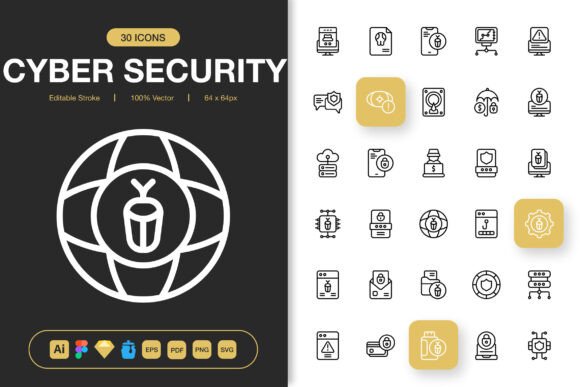
A Cyber Security Icons Pack is a curated collection of graphic symbols focused specifically on themes of digital safety, data protection, and network security. Think of icons for firewalls, shields, padlocks, hackers, warning triangles, secure connections, biometric scans, and malware—all rendered in a cohesive visual style. This isn't just a random assortment of clip art. It’s a designed system meant to work together, ensuring that whether you use one icon or fifty, they share the same line weight, aesthetic, and level of detail.
The key value here is consistency and clarity. When you're communicating complex or abstract security concepts, a clear visual can bridge the gap much faster than text alone. A well-designed icon pack provides that visual shorthand.
Where and Why People Actually Use These Icons
The use cases extend far beyond just "making a website look nice." They touch on education, internal communication, client relations, and public awareness.
For Professionals Building Tools and Platforms
If you're a developer or designer creating a SaaS application, an admin panel, or a user settings page, you need intuitive UI elements. A login security status indicator with a simple shield icon is instantly understood. An illustration of two connected devices with a lock over them conveys "secure tunnel" without a caption. Using a unified icon set across your entire project maintains a professional, trustworthy feel, which is paramount in security-sensitive software.
For Educators and Trainers
Creating presentations, handouts, or online course materials about cybersecurity topics? Icons serve as memorable anchor points. When explaining the steps of multi-factor authentication, an icon sequence showing a password, a smartphone, and a fingerprint can make the process flowchart much easier to follow. In corporate training slides or public awareness infographics, these visuals help break down intimidating topics into approachable components.
For Marketers and Content Creators
Bloggers writing about online safety, marketers promoting a new VPN service, or social media managers running a campaign about data privacy all need engaging visuals. A minimalist icon can be the perfect centerpiece for a Facebook post or Instagram carousel explaining "what to look for in a secure website." They add authority and polish to flyers, posters, or eBook covers focused on digital wellness.
A Realistic Scenario
A freelance consultant is preparing a proposal document for a small business, outlining a new cybersecurity protocol. The document is dense with text. Sprinkling in clean icons next to key sections—like a detective magnifying glass for "threat assessment" and a fortress for "network hardening"—not only makes the document more visually scannable but also subtly reinforces the consultant's expertise and attention to detail.
How Different Users Benefit in Different Situations
The benefit shifts depending on who you are and what you're trying to accomplish.
For a busy entrepreneur building their company's website, the benefit is speed and cohesion. They can drag and drop a PNG file into their web builder to add a visual next to their "Our Security Promise" section without hiring a designer.
For a graphic designer working on a full branding project for a tech startup, the benefit is depth and flexibility. Having the source Adobe Illustrator or Figma file means they can tweak the stroke color to match the brand palette, combine icons, or scale them to any size without quality loss, integrating them seamlessly into logos, stationery, and app interfaces.
For a university lecturer, the benefit is pedagogical. The icons become teaching aids, reusable across semester slides, study guides, and online learning modules, creating a consistent visual language that students begin to associate with specific concepts.
For a hobbyist running a personal tech blog, the benefit is professionalism. Using high-quality, themed icons elevates their content above typical blog posts, making it more shareable and credible.
What the Included Files and Features Mean in Practice
Listing "EPS, SVG, PNG, Figma, Sketch" might sound technical, but it translates directly to real-world workflow compatibility.
The multiple PNG sizes (from 32px to 512px) mean you have the right resolution file ready to go. The 32px version might be perfect for a mobile app toolbar, while the 512px version could be used as a prominent graphic on a poster without appearing pixelated. You don't have to resize yourself and risk blurry edges.
Having the source files (like Illustrator or Figma) and the SVG format is about control and future-proofing. If your project's theme color changes next year, you can open the SVG or Illustrator file, change the stroke to the new color in minutes, and re-export. If you need an icon to be slightly thicker to match another design element, the editable stroke allows that. The IconJar file helps designers organize and quickly search the entire set within their design software.
The README file often contains quick instructions or a cheat sheet, which is invaluable when you're in the middle of a project and just need to know how to import the Figma file correctly.
Considering Before You Apply or Choose a Set
Before integrating any icon pack into your project, pause to consider a few practical questions. Does the minimalist style align with your existing or intended design language? A very detailed, ornate icon set would clash with a clean, modern interface. Conversely, extremely simple icons might lack the visual weight needed for a bold poster.
Think about scope. Does the pack contain the specific icons you know you'll need? Check for symbols related to your core topics—like "data breach," "antivirus," or "cloud security." Also, consider future needs. A comprehensive pack might include icons you don't need today but could use next quarter.
Finally, weigh the format against your tools. If you solely work in Canva or Google Slides, the PNG files will be your go-to. If you collaborate with a team in Figma, the Figma file format is essential for a shared, editable library. Ensuring the pack delivers files for your primary software avoids a frustrating conversion process later.
The goal of a specialized resource like a Cyber Security Icons Pack is to remove friction from your creative or communicative process. It provides a ready-made visual vocabulary that lets you focus on your message, your training, or your design, rather than on hunting for scattered, mismatched graphics. When the icons are high-quality, customizable, and delivered in the formats you actually use, they become a reliable tool in your toolkit, changing the look of your next project by bringing clarity, consistency, and a modern visual edge to any discussion about protecting our digital lives.