Essential Guide to Startup Icons for Modern Project Design
In the crowded landscape of digital assets, finding a set of icons that truly balances quality, flexibility, and practicality is a common challenge for designers and developers. Startup Icons represents a specific offering within this category, designed to address the needs of projects requiring a clean, minimalist aesthetic coupled with extensive format support. Understanding what this particular resource provides, and where it sits among broader alternatives, is key to making an informed selection for your work.
The Core Distinction of Startup Icons
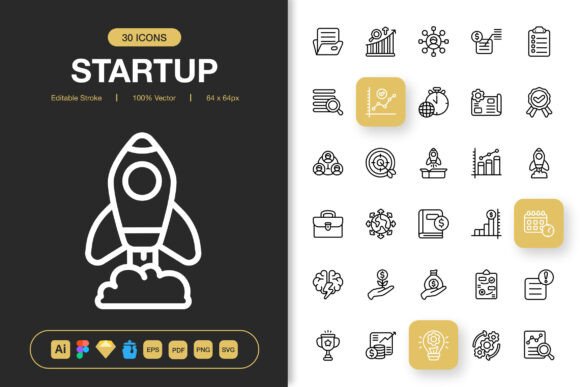
Startup Icons is not merely a collection of graphical symbols; it is a packaged solution focused on minimalist icon design. This intentional style choice makes it suitable for a wide array of applications, from websites and mobile apps to print materials like flyers and posters. Its defining characteristic is the emphasis on simplicity and clarity, which avoids visual clutter and aligns with contemporary design trends that prioritize user experience and quick comprehension.
What sets it apart from many generic icon packs is the bundled provision of source files across multiple professional formats. This includes the original Adobe Illustrator file, a Figma file, a Sketch file, an EPS version, and a SVG file, among others. For a practitioner comparing options, this multi-format availability is a significant practical benefit. It means the icons can be seamlessly integrated into different design environments and workflows without the need for tedious conversion or recreation. The inclusion of a readme.txt file further suggests an attention to usability and setup guidance, which can be a welcome detail for teams or individuals managing asset libraries.
Evaluating Features Against Project Requirements
The advertised features of Startup Icons—Editable Stroke, High Quality, 100 Customizable icons, and Easy Drag and Drop—point towards a resource built for hands-on customization and efficiency. The "Editable Stroke" feature implies that the icons are not static raster images but vector-based, allowing designers to adjust line weights, colors, and shapes without loss of quality. This is a crucial capability when branding or specific stylistic adjustments are required.
The package also includes PNG files in a range of predefined sizes (32px to 512px). This offers a ready-made solution for common development scenarios where specific pixel dimensions are needed, potentially saving time. However, a tradeoff exists here: while the preset sizes are convenient, a project requiring a non-standard size would still rely on the vector source files for scaling. Compared to some alternatives that might offer a web font or an icon system with dynamic sizing, this is a consideration for projects with highly variable or responsive icon requirements.
Strengths and Ideal Use Cases
The strengths of Startup Icons are clear in situations that demand a cohesive, minimalist visual language across mixed media. Its versatility across digital and print applications is a notable advantage. For example, a small business launching a unified campaign might use these icons for their website's UI, social media graphics, and printed brochures, maintaining consistency without purchasing separate assets for each medium.
It also fits well for projects where the design phase involves experimentation across different tools. A team using Figma for prototyping, Illustrator for final asset creation, and needing PNGs for developer implementation would find the bundled file formats reduce friction. The 100 icons, while not an exhaustive library, provide a solid foundational set for common concepts like navigation, actions, and objects, suitable for many startup, tech, or modern business themes.
Comparison Context and Decision Factors
When evaluating Startup Icons against the wider universe of icon resources, several decision factors emerge. One major category comparison is between pre-made icon packs like this and icon font libraries or open-source SVG frameworks. Icon fonts offer incredible scalability and easy color change via CSS, which is excellent for purely web-based projects. Startup Icons, with its standalone SVG and PNG files, offers more direct control for complex illustrations or mixed print/digital use but may require more manual management in a web project.
Another consideration is the style spectrum. Minimalist design, which Startup Icons embodies, is distinct from highly detailed, illustrative icon sets or overly playful, cartoonish styles. If your project's brand voice is sleek, professional, and functional, a minimalist set is often the better fit. Conversely, for a project targeting children or requiring dense visual metaphor, a more detailed set might be necessary. Startup Icons would likely be a mismatch in the latter scenario.
The promise of customization is another area to scrutinize. "100 Customizable" icons suggests adaptability, but the extent of that customization depends on the user's skill with vector editing software. For a designer proficient in Illustrator or Figma, this is a powerful feature. For a marketer or small business owner with limited design software expertise, the easy drag-and-drop of PNGs might be the primary usable benefit, leaving the deeper customization potential untapped. This is a common tradeoff with asset packs that provide source files; their value is proportional to the user's ability to leverage them.
When Startup Icons May Not Be the Optimal Choice
Despite its broad suitability, there are realistic scenarios where selecting Startup Icons might not be the best path. If your project requires a vast, niche-specific icon library—for instance, hundreds of icons for medical equipment or intricate financial symbols—a limited set of 100 general-purpose icons may fall short. In such cases, seeking a more specialized pack or considering a subscription to a larger icon platform could be more efficient.
Similarly, for projects that are exclusively web-focused and where development speed is paramount, an icon font or a integrated SVG sprite system might offer faster implementation through simple class changes and automatic scaling. The need to manage multiple individual SVG or PNG files from Startup Icons could introduce additional overhead in a fast-paced web development environment.
Budget is also a factor. While this article avoids specific pricing, the value proposition of Startup Icons hinges on the one-time provision of multi-format source files. For a long-term project with evolving needs, a single purchase might be cost-effective. For a designer who needs constant access to new and varied icons across many client projects, a subscription service with a continuously updated library might offer more long-term utility, albeit at a recurring cost.
Making an Informed Selection
The choice of an icon resource is rarely absolute; it depends heavily on the specific contours of the project at hand. Startup Icons presents a compelling package for those seeking a minimalist, multi-format, and customizable foundation. Its design philosophy avoids hype and focuses on clean utility, which is reflected in its feature set.
To decide, weigh your project's medium (web, print, or mixed), your team's tool proficiency (especially with vector software), the required icon volume and specificity, and the desired stylistic tone. For a modern website needing a clean interface, accompanying mobile app graphics, and print collateral, Startup Icons covers that spectrum effectively. For a purely web-based application needing dynamic resizing and where design tool access is limited, the benefits of the bundled source files might not be fully utilized, making other alternatives worth exploring.
Ultimately, resources like Startup Icons serve to bridge the gap between generic stock assets and fully custom illustration. They offer a curated, professional starting point that can be adapted, saving significant time from a blank canvas while retaining a degree of creative control. By understanding its distinct offerings and honestly assessing your project's needs against its features and inherent tradeoffs, you can determine if this particular set is the right tool to change the visual direction of your next project.